Git Bash파일 만들기
pwd #현재 내가 위치하고 있는 곳이 어디인지 확인해보세요.

cd 폴더이름 #리액트 프로젝트를 생성하고 싶은 폴더로 들어갑니다.

yarn create react-app nminyfile #프로젝트 생성!
yarn 에서 styled-components 설치
yarn add styled-components리덕스 설치
yarn add redux react-redux

# 아래와 같은 의미
yarn add redux
yarn add react-redux
react-router-dom 설치하기
yarn add react-router-dom툴킷 설치하기
yarn add react-redux @reduxjs/toolkit
axios 설치
yarn add axiosjson-server 설치
yarn add json-server

json-server --watch db.json --port 4000(번호) 입력
bash: json-server: command not found 뜨면

npm install -g json-server 하고 다시

json-server --watch db.json --port 번호 입력
Lodash라이브러리 설치
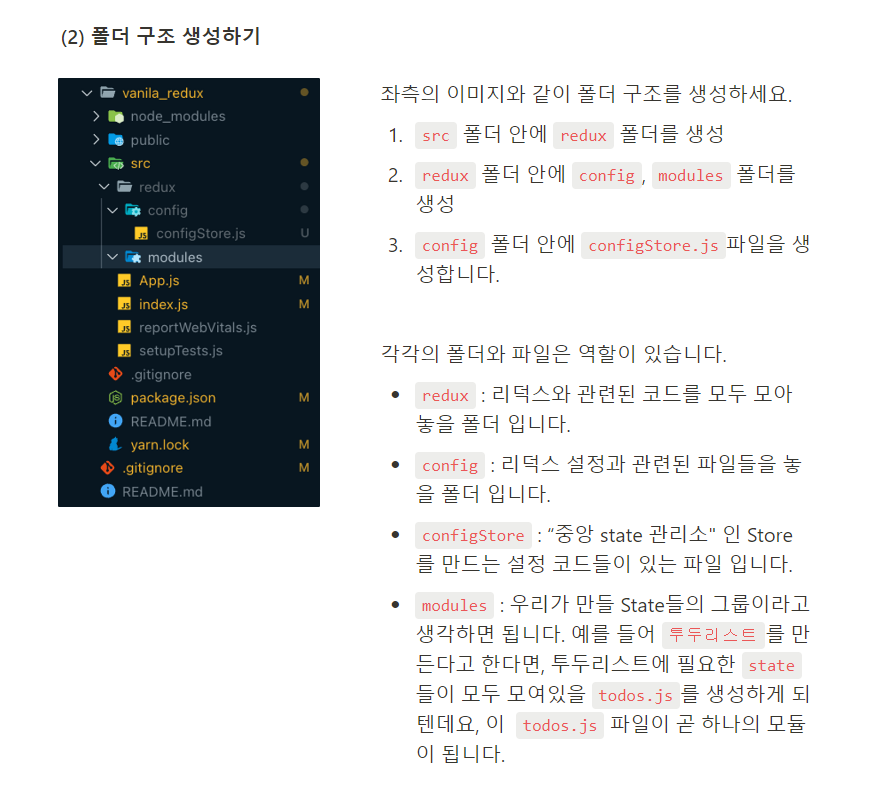
yarn add lodash폴더 구조 생성하기
글로 정리하기..
'메모장' 카테고리의 다른 글
| 클론 코딩 피드백 (0) | 2023.05.18 |
|---|---|
| 라이프사이클(클래스형 vs 함수형), React hooks (0) | 2023.04.30 |
| props 객체에 따라 동적으로 스타일링 적용하기 (0) | 2023.04.26 |
| UUID(범용 고유 식별자) (0) | 2023.04.24 |
| State, Props, 리-렌더링 발생 조건 (0) | 2023.04.23 |